Whenever you’re planning a new online business, the very first question that comes to mind is usually:
“Can this type of website still get organic traffic from Google?”
Organic search traffic has always been the highest-quality source of visitors. People searching on Google already have intent, which means they convert much better than traffic coming from social media or random ads.
The problem? AI is changing everything.
Today, when you search on Google, you’re often greeted by an AI-generated overview before you even reach the organic results. Users get the answer they’re looking for in just a few lines… and leave. No click required. Sure, if your content is outstanding Google may cite your website as a source, but let’s be honest: only a handful of massive websites consistently receive that privilege.
And in many cases, people don’t even start with Google anymore: they simply open ChatGPT or Gemini and ask whatever they need.
That made me wonder… “Is there still a niche where people absolutely need to search on Google and actually click a website?”
Yes. Porn.
Unlike informational searches (for example, “how to cook carbonara”), someone searching for a specific performer or a particular scene isn’t looking for an AI summary. They want the actual content. Or they want a website that hosts it, organizes it, or helps them find it.
That’s exactly why this niche still offers one of the biggest SEO opportunities available today.
What AI and Social Media Can’t Replace
Let’s start with a few simple facts.
- Millions of people visit adult websites every single day.
- Users search for specific creators, pornstars, categories and niches.
- Adult websites monetize traffic extremely well.
- AI assistants and mainstream social media platforms simply cannot display this kind of content.
What does this mean?
It means that if you build a well-designed adult website filled with interesting and unique content, you’ll always have an audience.
No matter how many competitors already exist.
No matter how many new websites launch tomorrow.
If your site provides value and targets the right audience, especially internationally, you’ll always have room to grow.
People will continue searching for things like:
- “Full scene with Performer X”
- “Where can I watch videos from TikToker Y?”
- “Best videos featuring…”
And your website can be there.
The Complete Step-by-Step Guide to Building and Monetizing an Adult Website
This guide is designed to be incredibly easy to follow. We’ll use AI extensively, which means you’ll find ready-to-use prompts throughout the tutorial.
Your job?
Simply follow the instructions: Copy. Paste. Done.
Within just a few hours you’ll have a fully functional adult website ready to publish.
Want a preview?
By the end of this guide, you’ll have a website similar to this:
https://www.goonvidz.com

What You’ll Learn
- Setting up your technical environment
- Buying a domain and VPS with Hostinger
- Installing SSL and WordPress
- Building the entire website
- Installing WPScript
- Using every important WPScript tool
- Importing videos in bulk from the biggest providers
- Choosing video partners that actually pay you
- Setting up VAST video advertising
- Improving your site’s design
- Monetizing your website
- The best adult advertising networks
- Adding banners correctly
- Promoting your website
- Creating SEO-friendly content
- Using AI tools to grow your traffic
Need help or planning something similar? Feel free to chat with me, use the Whatsapp icon bottom-right
Estimated cost for the entire project: one-time €89 for WPScript + approximately €90/year for hosting and domain renewal.
STEP 1 – The Best Budget Hosting for an Adult Website
Let’s start building.
The very first thing you’ll need is web hosting.
Ideally, you should choose a VPS rather than shared hosting. That way you’ll have dedicated resources, faster loading speeds, and enough power to grow your website over time. For this kind of project, my recommendation is Hostinger.
Their policies allow adult content, and their VPS plans offer one of the best price-to-performance ratios currently available.
For this guide, the Hostinger KVM 1 plan is more than enough. Expect to spend roughly €70 for one year.
Once you’ve purchased your VPS, open ChatGPT and paste the following prompt exactly as it is:
🤖 ChatGPT Prompt – Website Installation
During the WordPress installation you’ll also choose an administrator username and password.
Save them somewhere safe.
You’ll use those credentials to access your WordPress dashboard at: https://www.yourwebsite.com/wp-admin
STEP 2 – Installing WPScript: Build Your Adult Website in Minutes
Now that WordPress is up and running, it’s time to install the plugin that will do most of the heavy lifting.
The plugin is called WPScript, and it’s specifically designed for building adult tube websites with very little manual work.
Its main features include:
- Installing a professional tube-style theme.
- Importing videos in bulk from major providers like xHamster, XNXX and TubeCorporate.
- Giving you full control over what gets imported, where it’s published and how it’s categorized.
- Allowing you to upload your own videos directly to your hosting.
- Managing categories, tags, performers and every other aspect of your website from WordPress.
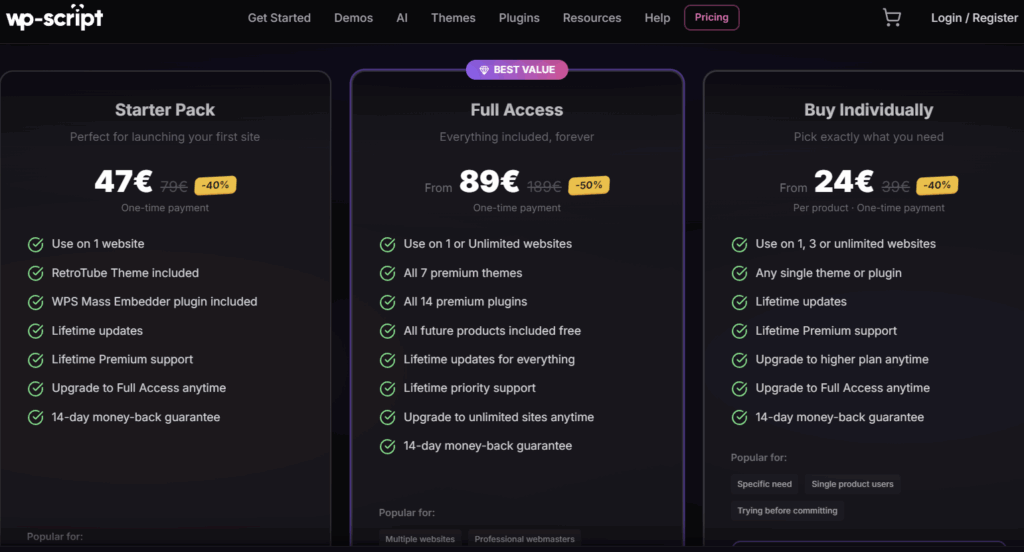
I strongly recommend purchasing the Full Access license.
Not only can you install it on unlimited websites, but you’ll also gain access to every available theme, including TikSwipe, which lets you create a TikTok-style vertical video section for your visitors.
You’ll also unlock several premium plugins, including WPS Player, which allows you to monetize self-hosted videos with VAST advertisements (the classic “Skip Ad in 5 seconds” format).
STEP 2.1 – Installing WPScript
Purchase the Full Access plan from WPScript (at the time of writing, it’s available for €89 as a lifetime license with no renewals).
Once purchased:
- Download WPScript Core from your dashboard.
- Open the License Key section and copy your license. You’ll need it in a moment.
- Log into your WordPress dashboard (https://www.yourwebsite.com/wp-admin).
- Go to Plugins → Add New → Upload Plugin.
- Upload the ZIP file you downloaded.
- Activate the plugin and when prompted, paste your License Key.
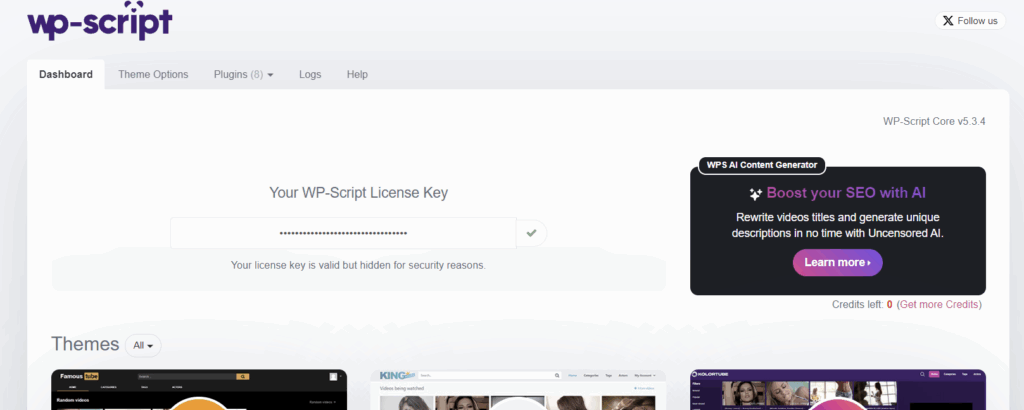
That’s it, you now have the core of your entire website installed.
Let’s unlock its full potential.
STEP 2.2 – Installing the Theme and the Most Useful Plugins
From the WordPress sidebar, navigate to:
WPScript → Dashboard
The first thing you’ll be asked to choose is your website theme.
I recommend RetroTube.
Yes, its default design may look a little old-fashioned, but it provides far more advertising placements than the other themes, making it easier to monetize your traffic. Later in this guide we’ll use ChatGPT to completely modernize its appearance using custom CSS.
Further down the page you’ll find the available plugins.
The ones I consider essential are:
- WPS Mass Embedder – Import videos in bulk from the largest adult tube websites.
- WPS Player – Display VAST advertisements on self-hosted videos.
- WPS Booster – Add initial likes, dislikes and views so your website doesn’t look empty when it launches.
Useful plugins you may want to install later include:
- WPS LiveJasmin – Integrate LiveJasmin cam previews and monetize them through the Awempire affiliate program.
- WPS Cookie Consent – A clean, lightweight cookie consent banner.
- WPS Disclaimer – An age verification popup shown before visitors enter your website.
💡 Pro Tip
Don’t worry too much about mandatory age verification laws yet. Several major adult websites still haven’t implemented them everywhere. When you eventually need one, services such as Go.cam provide free age verification solutions. I’ll publish a dedicated tutorial about that later.

Once everything is installed, there are just a few more settings before your website is ready.
Go to:
WPScript → Theme Options → Tools
Create every page and resource suggested there.
Then navigate to:
WPScript → Theme Options → General
Configure your homepage by choosing how many videos should be displayed and customize the remaining options according to your preferences.
Finally, go to:
WPScript → Theme Options → Logo & Favicon
Upload your logo and favicon.
That’s all we need for now.
Let’s start filling the website with content.
STEP 2.3 – Importing Videos
Before importing any videos, you should decide what kind of adult website you want to build.
If your goal is to create a classic multi-category tube website (similar to Pornhub or XVideos), you can create as many categories as you like. Simply navigate to:
WordPress → Videos → Video Categories
Type the category name (for example, Amateur) and click Add Video Category.
Based on my own experience, however, the strategy that works best in 2026 is building highly niche-focused websites.
Instead of trying to cover every category imaginable, dedicate your website to a single niche such as:
- MILF
- BBC
- Feet
- Femdom
- Fetish
- Cosplay
…or any other category you’re interested in.
If you choose this approach, your categories should simply become subcategories of your main niche.
For example, if you’re building a Fetish website, your categories could be:
and so on.
Once your categories are ready, it’s time to import your videos.
Open: WP-Script → Mass Embedder
Click Options and set the number of videos per search result to 60. Next, open the Auto Import tab.
Enable automatic importing and configure it to import 20 videos every hour (or whatever schedule you prefer).
This automation is one of the biggest advantages of WPScript.
After the initial setup, your website will continuously import fresh videos without requiring any manual work.
Everything is now ready. Go back to:
Import Videos
Here’s what you’ll do:
- Choose a video provider (for example, XVideos).
- Select one of the provider’s categories—or search using your own keyword.
- For this tutorial, let’s simply choose Amateur.
- Click Search Videos.
- A list of matching videos will appear.
- Select all the videos you want to import.
- Choose which category on your own website they should be assigned to.
- Click Import Videos.
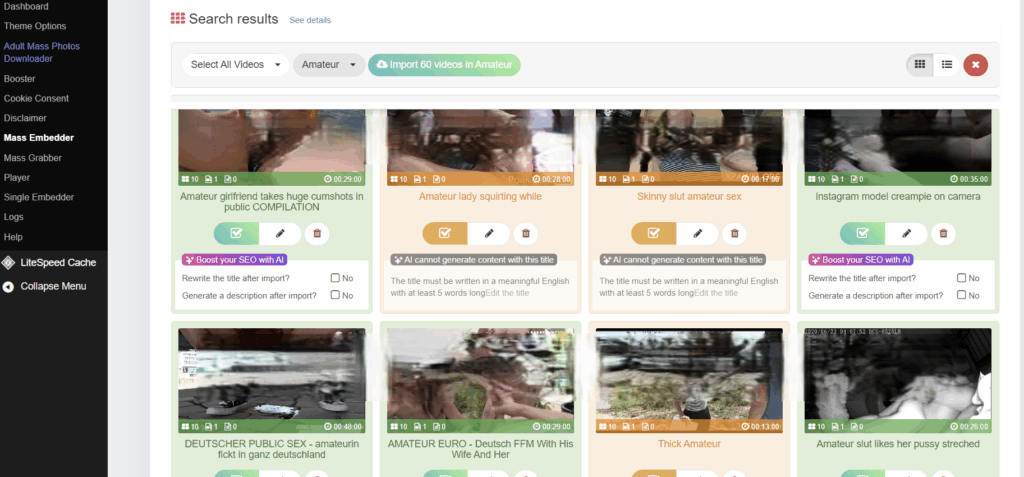
That’s it.
Your videos are now published on your website.
You’ll also notice a section called Feeds, this is where WPScript saves every import rule you’ve created.
Simply click the Pause icon and then activate the Play icon. From that moment on, WPScript will automatically continue importing new videos that match your original search.
For example, if your feed is:
XVideos → Amateur → Amateur category on your website
the plugin will automatically import new videos every hour (or according to the schedule you configured).
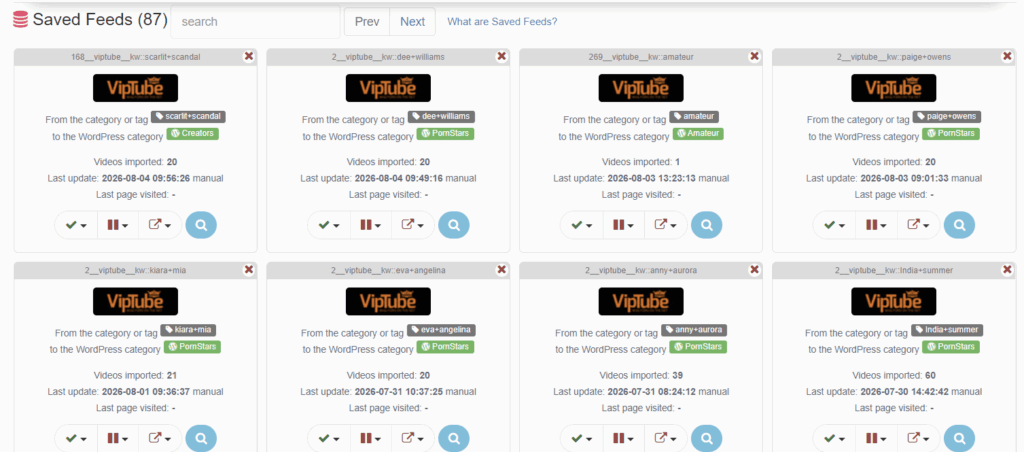
No additional work required: simply repeat the process for every category you want to build.
💡 Pro Tip
Before importing a video, click on it and edit its details whenever possible.
If they’re missing, add a short description and the performer’s full name.
You should also slightly rewrite the title instead of leaving the original one unchanged.
These small changes make every page more unique, improve your chances of ranking on Google, and help organize your website through Actors and Tags.
STEP 2.3.1 – Video Partners That Actually Pay You
In the previous example we imported videos from XVideos. That’s great for filling your website with content…
…but not for making money.
Websites like:
allow you to embed videos, but they don’t pay you for the views those videos receive.
If your goal is monetization, you should connect providers that belong to affiliate networks.
The two most important ones are:
After joining them, WPS Mass Embedder will allow you to import videos from websites such as:
- TXXX
- HClips
- VJAV
- HDZog
- UPornia
- HotMovs
- ManySex
- DesiPorn
- Senzuri
- 01Tube
- BDSMX
- BlackPorn
- GetTranny
- LesbiGo
- PornLatina
- PornTop
- VXXX
- XMilf
- AniPorn
As you’ve probably noticed, many of these websites specialize in specific niches.
If you’re planning to build a niche website, choose your affiliate network accordingly.
When selecting one of these providers inside WPS Mass Embedder, you’ll be asked to enter your Affiliate ID and Campaign ID.
This connects every imported video to your affiliate account, allowing you to earn revenue from the traffic you generate.
For TubeCorporate, you’ll find your Affiliate ID immediately after logging into your dashboard.

To obtain your Campaign ID, navigate to:
Video → Campaigns → Create New Campaign
After creating it, the Campaign ID will be highlighted in red.
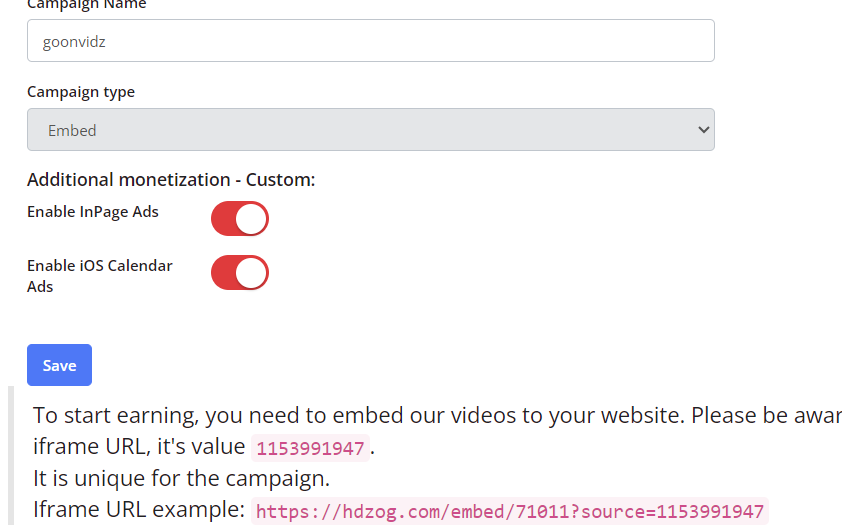
For MagmaClick, you only need the Campaign ID.
Navigate to:
Export → Select any provider → Video Status: Active → Campaign
A green URL will appear.
Simply copy the numbers that appear after campaign=.

In this example: 11924
⚠️ Note
If you’re having trouble following this guide, feel free to contact me.
I’ll be happy to help you get everything working correctly.
STEP 2.4 – Uploading Videos From Your Own Computer
If you already have your own video collection, or simply want to upload videos manually, you can do that as well.
First, navigate to:
Media → Add Media File
Upload your video. Once the upload is complete, open the file details and click:
Copy URL to Clipboard
Now go to:
Videos → Add Video
Here you’ll be able to configure:
- Title
- Description
- Category
- Thumbnail
- Video URL
Paste the URL you copied into the Video URL field.
Publish the post: Your video is now live.
If you’ve installed WPS Player, you can monetize self-hosted videos using:
- Display banners
- VAST preroll ads and Mid-roll advertisements (the same type of ads you normally see on YouTube).
Simply open:
WPScript → Player
and paste the advertising codes provided by your preferred ad network.
Later in this guide I’ll show you exactly where to obtain those codes.
STEP 2.5 – Give Your Website a Modern Look
If you don’t like the default appearance of your website, don’t worry.
Instead of editing CSS manually, we’ll let ChatGPT redesign the entire theme for us.
Use ChatGPT Work Mode and paste the following prompt.
🤖 ChatGPT Prompt – Graphic Redesign
Analyze the website https://www.yourwebsite.com, built with the RetroTube theme by WPScript.

Carefully examine the homepage, video pages, archives, navigation menu, player, sidebar, footer, and mobile version.

Then generate a complete CSS stylesheet that I can paste exclusively into the theme's "Additional CSS" field, without requiring any changes to PHP, HTML, or JavaScript files.

The goal is to completely modernize the website's appearance while preserving its existing structure and all of its functionality.

In particular, I want:

- a modern and highly readable font;
- more elegant menus, buttons, and navigation links;
- more attractive H1, H2, H3, and H4 headings;
- video cards with rounded corners, subtle shadows, and modern hover effects;
- more balanced spacing and margins;
- a clearer visual hierarchy throughout the website;
- cleaner and better-organized sidebars and widgets;
- more modern forms and search fields;
- an improved visual presentation of the video player and video information;
- a fully responsive layout that looks excellent on both desktop and mobile devices.

Before writing the CSS, analyze the website's code and identify the selectors actually used by the theme.

If some elements cannot be accessed because they require login or are not visible from the homepage, tell me exactly which URLs or screenshots you need before completing the CSS.

Do not change the website's colors, logo, or branding unless strictly necessary. Focus exclusively on improving the design and overall user experience.

Return the CSS divided into clearly commented sections (Header, Menu, Cards, Player, Sidebar, Footer, Responsive, etc.) so that it will be easy to edit in the future.
ChatGPT will generate a complete CSS stylesheet.
Simply log into your website, click:
Customize → Additional CSS
Paste the generated CSS and save your changes. The visual improvement will be immediately noticeable, but if you’re still not satisfied, simply take a few screenshots and tell ChatGPT exactly what you’d like to improve.
Or…feel free to contact me and I’ll help you achieve the look you’re aiming for.
STEP 2.6 – Legal Pages
Having the correct legal pages is essential.
In particular, your DMCA Policy is something many advertising networks require before approving your website.
It’s much better to create everything before applying.
Use the following prompt.
🤖 ChatGPT Prompt – Legal Pages
For my website https://www.yourwebsite.com, using info@yourwebsite.com as the contact email address, generate the following complete legal pages in English:

- 18 USC 2257 Statement
- DMCA Policy
- Privacy Policy & Cookie Policy (compliant with GDPR and the main applicable international privacy regulations)

The pages must be specifically written for a WordPress adult tube website monetized through display advertising, affiliate links, and VAST video ads.

Use professional, clear language and make each page ready to be published directly on the website.

If specific information is legally required to properly draft any of these pages (for example, company name, country of operation, business details, VAT number, data controller information, or other mandatory details), stop and ask me for that information before generating the final version. Do not invent any legal or business information.

Format each page using H2 and H3 headings where appropriate and provide each document separately, so I can copy and paste them directly into individual WordPress pages.

Clearly indicate any sections that may require additional customization depending on my country, business structure, hosting setup, advertising providers, analytics tools, or third-party services used by the website.

Do not claim that the documents guarantee legal compliance. If any requirement depends on jurisdiction or specific circumstances, point it out clearly.
Once ChatGPT has generated the pages, simply open:
WordPress → Pages → Add New
Create one page for each document:
- 18 USC 2257 Statement
- DMCA Policy
- Privacy Policy
- Cookie Policy
Paste the generated content and publish each page.
Next, navigate to:
Appearance → Menus → Footer Menu
Add every legal page to your footer menu.

If your theme doesn’t already include one, simply create a new menu named Footer, then assign it to the Footer Menu location.
At this point, your website is fully configured and ready to move on to the next phase: making money.
STEP 3 – Monetize Your Adult Website: The Best Ad Networks and Banner Placement
At this point, your website is essentially complete.
In fact, you’ve already taken your first step toward monetization by importing videos from TubeCorporate and MagmaClick, since those partners pay you whenever visitors watch their content.
Of course, if you want to earn serious money, you’ll need traffic.
We’ll cover that in the next section. For now, let’s focus on the advertising networks that pay the best and where you should place their banners and creatives on your website.
The Best Adult Advertising Networks
CPM & CPC Networks
These networks pay you for banner impressions (CPM) or clicks (CPC).
My recommendations are:
- ExoClick – The best overall choice for display banners, sliders and VAST video ads.
- JuicyAds – Excellent for popups and popunders.
- Clickadilla
- AdsTerra – Particularly profitable thanks to its Social Bar format.
Affiliate Networks (CPA, CPL, CPS & RevShare)
Instead of paying for impressions, these platforms pay commissions whenever visitors register, subscribe or purchase through your affiliate links.
Some even offer lifetime revenue sharing.
The networks I recommend are:
Explaining every single network individually would require an entire guide of its own. Fortunately, they all follow a very similar approval process.
Simply sign up and submit your website URL. Almost every advertising network will ask you to verify ownership of your website before approving your account.
Most of them provide a simple HTML verification tag that looks something like this:
Whenever a network asks you to verify your website this way, copy the verification code and paste it into:
WPScript → Theme Options → Code → Meta Verification
You’ll find several fields there where you can paste multiple verification codes.

Save your changes and return to the advertising network to complete the verification process.
Adding Banner Advertisements
Once your website has been approved, you’ll be able to create advertising zones.
Typical banner sizes include:
Copy the generated HTML or JavaScript code and paste it into:
WPScript → Theme Options → Advertising
For mobile-only advertisements, use:
WPScript → Theme Options → Mobile → Advertising

Popups, Push Notifications and Other Special Formats
Most networks also provide more aggressive advertising formats such as:
- Popups
- Popunders
- Push Notifications
- Interstitial Ads
- Floating Video Sliders
Instead of placing these inside the advertising panel, I recommend adding them through WordPress widgets.
Go to:
Appearance → Widgets
Create a Custom HTML widget inside your Sidebar and paste the advertising code there.
Monetizing Self-Hosted Videos
If you’ve installed WPS Player, you can also monetize videos that you upload yourself.
Networks such as ExoClick allow you to generate a VAST advertising URL.
Simply paste that URL into:
WPScript → Player
Your videos will automatically display preroll and midroll advertisements, just like YouTube. This is one of the highest-performing monetization methods available for self-hosted adult content.
Affiliate Links
Affiliate networks don’t only provide banners.
In many cases, simple text links perform even better.
You can place them:
- inside your website menu (Appearance → Menus → Custom Links)
- inside video descriptions
- inside blog articles
- inside recommendation widgets
Experiment with different placements and keep the ones generating the highest conversions.
At this point your website is fully operational. You have:
- imported content;
- configured monetization;
- prepared your legal pages;
- added banner spaces;
- connected affiliate offers.
Now comes the most important part of the entire project: getting traffic.
Because no matter how good your monetization is, without visitors there are no earnings.
In the next section, I’ll show you the exact strategies I personally use to bring consistent traffic to adult websites.
STEP 4 – How to Drive Traffic to Your Adult Website
This is undoubtedly the most challenging part of the entire project. As we discussed at the beginning of this guide, your number one objective should be generating consistent organic traffic through SEO.
However, Google isn’t the only traffic source available.
In this section, I’ll show you the strategies I personally use to bring visitors to adult websites.
Strategy #1 – SEO: Unique Features, Original Content and Better Metadata
The first strategy is also the most important one.
Your goal should be making your website unique in the eyes of both users and search engines.
As I mentioned earlier, whenever you import videos you should avoid publishing them exactly as they come.
Instead:
- slightly rewrite the title;
- add your own description;
- include the performer’s full name whenever possible.
These small improvements make every video page more unique than the thousands of websites importing the exact same content. But uniqueness isn’t only about titles.
This is where AI becomes incredibly powerful: using ChatGPT, you can create custom features that very few competitors have.
For example, on my own website GoonVidz, I developed a WordPress plugin that lets users select any two performers and instantly displays every scene where they appear together.
You can see it here: GoonVidz Duo
Besides being genuinely useful, it creates thousands of automatically generated pages such as: https://goonvidz.com/duo/ariana-marie/kiara-mia/
Google loves this kind of highly targeted URL because every page answers a very specific search intent.
Think about what unique functionality you could build for your own niche. Even a simple but useful tool can become a huge SEO advantage.
Strategy #2 – User Generated Content (UGC)
Another excellent way to differentiate your website is by letting visitors upload their own content. Fortunately, WPScript already includes this functionality.
Navigate to:
WPScript → Theme Options → Membership
Enable:
- Membership
- Video Submission
Then allow users to submit:
- Video Title
- Description
- Video File

I recommend making video uploads mandatory. Finally, enable every Membership Link available at the bottom of the page.
Why is this so valuable? Because every user who uploads content has a reason to come back; other visitors will comment; creators will share their own pages.
Your website gradually becomes a real community instead of just another video archive. And that’s something search engines appreciate too.
Strategy #3 – Telegram & X for Adult Content. Instagram, Threads, Facebook and TikTok for Soft Content
Creating an official Telegram channel and an X account is one of the easiest ways to promote your website.
There you can publish:
- newly imported videos;
- pornstar news;
- industry updates;
- exclusive previews;
- AI-generated adult content.
One of my favorite tools for generating AI adult images is: Pornworks.com

You can both generate your own content for free and browse creations made by other users.
Mainstream social networks don’t allow explicit adult material. That doesn’t mean you can’t use them.
One strategy that works surprisingly well is generating hyper-realistic AI influencers with ChatGPT, then animating them using services such as:
The resulting videos are completely safe for social media but attract an incredible amount of attention.
Threads and Facebook Groups, in particular, can generate a surprisingly high number of visitors.
Here’s an example prompt that creates a realistic female profile.
🤖 ChatGPT Prompt – Soft Image Generation
Ultra realistic smartphone selfie of a young brunette woman sitting on her bed in a cozy bedroom during golden hour. Natural sunlight enters from a side window, creating soft warm highlights on her face and hair. She wears a white knitted crop top and white bottoms. Long dark brown hair, slightly messy, minimal makeup, thick eyebrows, natural lips, relaxed neutral expression looking directly into the camera. The room looks lived-in with everyday objects in the background, giving an authentic Instagram feeling. Captured with an iPhone 15 Pro front camera, slight lens distortion, realistic skin texture, subtle imperfections, no glamour retouching, candid social media aesthetic, photorealistic.

Once you’ve created your AI model, you can generate endless new photos while maintaining the exact same identity.
Simply upload the previous image as a reference and use this prompt.
🤖 ChatGPT Prompt – Alternative Soft Image
Use the reference image as the exact identity reference. Keep the same face, hairstyle, eyebrows, skin tone and overall appearance.

Create an ultra realistic smartphone mirror selfie inside a modern gym locker room.

She is wearing a dark charcoal sports bra and matching high-waisted seamless gym shorts.

She is standing sideways in front of a large mirror, slightly twisting her torso toward the camera to emphasize the athletic pose. One hand holds the phone in front of her face while the other arm hangs naturally. She is playfully winking and sticking her tongue out.

Modern locker room with dark wood lockers, gray walls, benches, ceiling spotlights and a gym bag with a water bottle nearby.

Natural athletic body, realistic muscle tone, authentic smartphone quality, slight mirror reflections, subtle noise, soft indoor lighting, candid fitness influencer selfie, iPhone 15 Pro photo, extremely photorealistic, no beauty filter, no CGI look.

Maintain exactly the same facial proportions, eye shape, nose, lips, jawline and hairstyle as the reference image.

Do not beautify or alter her identity.

Keep the image looking like a genuine smartphone photo posted on Instagram, with natural imperfections, realistic lighting and authentic skin texture.

Finally, use Kling to transform those images into short videos.
🤖 Kling 3.0 Prompt – Image to Video
Videos like these can quickly accumulate thousands, or even millions, of views across social platforms.
From there, you can direct your audience to your Telegram channel or straight to your website.
Strategy #4 – Buying Traffic
The final strategy is also the most expensive one: Paid advertising.
Before investing money, though, make sure your website actually offers something unique.
Launching paid campaigns to promote a website that’s identical to hundreds of others is rarely a good investment.
Once you’ve developed your own identity, however, buying traffic can significantly accelerate your growth.
The advertising networks I recommend are:
- RichAds – Excellent and affordable Push Notifications.
- TrafficStars – Another great platform for Push Ads.
- TrafficJunky – Includes placements on massive websites such as Pornhub.
Experiment with different traffic sources, analyze your results, and gradually increase your budget only on campaigns that are already profitable.
Conclusion
Don’t think Artificial Intelligence is going to prevent you from building a successful online business. Quite the opposite.
If used correctly, AI dramatically reduces the technical barrier, automates repetitive tasks, and allows you to launch projects in a fraction of the time that was required just a few years ago.
This guide is proof of that.
In just a few hours you’ve gone from having nothing…
…to owning a fully functional adult website that’s ready to attract visitors and generate revenue.
If you have any questions about this guide, or simply want to discuss your own project, feel free to contact me through my personal chat.